Car Detailing Payments: Get Paid Faster, Every Way
Take deposits and full payments online when clients book, or in person with Tap to Pay. Cards, Apple Pay, Google Pay, and pay-later options work out of the box, and your money lands in your own bank account, fast.
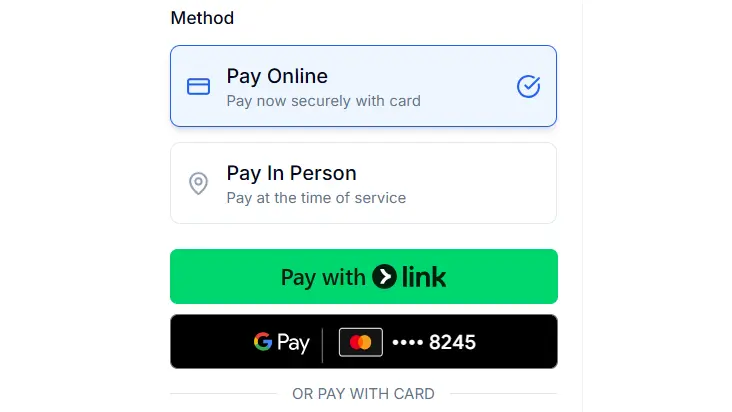
Get paid the moment clients book
Turn on online payments and clients pay right on your branded booking page. Take a deposit to lock in the slot, or the full amount up front, so the job is paid before you pick up a towel.
- Require a deposit, a percentage or a flat amount
- Or collect the full price at checkout
- Deposits credit toward the final invoice
Every way your clients want to pay
Cards, Apple Pay, Google Pay, Cash App, and Link are ready out of the box. On Pro and Business, clients can split bigger details into installments with Affirm, Klarna, and Afterpay.
- Visa, Mastercard, Amex, plus Apple Pay and Google Pay
- Pay-later with Affirm, Klarna, and Afterpay on Pro and Business
- Clients pick their method, you just get paid
Take payment in person, no card reader
Tap to Pay on iPhone turns your phone into the terminal. Accept a contactless card or phone with a tap, with no extra hardware to buy or carry.
- Tap to Pay on iPhone, no separate reader
- Great for walk-ins and add-ons sold on site
- Every payment lands in the same place
Your money, in your own bank account
Payments go straight to your own Stripe account, not a middleman. DetailPilot never holds your funds, and payouts reach your bank typically within about two business days.
- You own the Stripe account and the money
- Automatic payouts to your bank
- Track pending and available balances at a glance
Why detailers turn it on
- Get paid faster: Collect at booking or on site instead of chasing invoices after the job.
- Every payment method: Cards, Apple Pay, Google Pay, Cash App, and Link all work from day one.
- Deposits stop no-shows: Ask for a deposit up front to filter out tire-kickers and protect your calendar.
- Pay-later for bigger jobs: Affirm, Klarna, and Afterpay help clients say yes to ceramic and paint correction. Pro and Business.
- Tap to Pay in person: Turn your iPhone into a card terminal for walk-ins and on-site add-ons.
- Money in your bank: Funds go to your own Stripe account and pay out to your bank, fast.
How it works
- Connect Stripe: Link a Stripe account in a couple of taps. It is free and handles the payments securely.
- Choose your methods: Switch on the cards, wallets, and pay-later options you want to offer.
- Get paid: Clients pay at booking or in person, and your money pays out to your bank.
Related features
- Car Detailing Online Booking Software That Books 24/7
- Live Tracking & Real-Time ETA for Car Detailers
Frequently asked questions
What payment methods can my clients use?
Cards (Visa, Mastercard, Amex), Apple Pay, Google Pay, Cash App, and Link are available out of the box. Pay-later options like Affirm, Klarna, and Afterpay are available on Pro and Business, depending on the client country.
Can I take a deposit instead of the full price?
Yes. You can require a deposit at booking, either a percentage or a flat amount, and it is credited toward the final price. You can also collect the full amount up front.
How do in-person payments work?
With Tap to Pay on iPhone, your phone becomes the card terminal. The client taps a contactless card or phone and you are paid, with no separate reader to buy. You can also mark a booking as paid in cash.
When do I get my money?
Payments go to your own connected Stripe account and pay out to your bank typically within about two business days. DetailPilot never holds your funds.
What does it cost to take payments?
Every account starts with a 14-day Pro trial, no credit card required. DetailPilot takes no commission on your payments, on any plan. Standard Stripe processing fees always apply.