How to Make a Car Detailing Website That Books Jobs (2026)
How to make a car detailing website that books jobs: the 7 things it needs, real 2026 costs (DIY, freelancer, agency), and the fastest way to get one live.
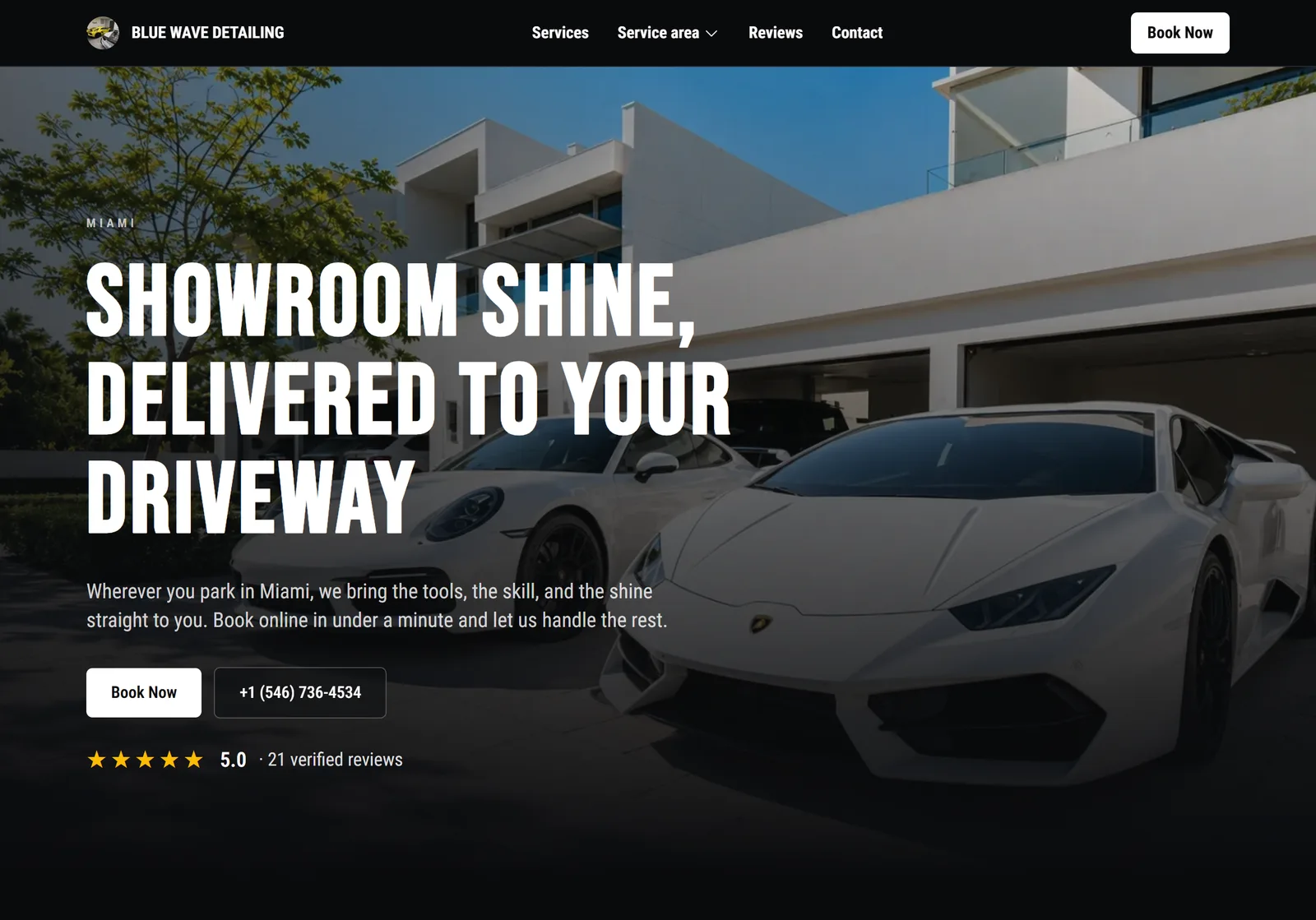
Before a customer books a detail, they Google you. And when they do, they compare: your online presence sits next to two or three other detailers in the same search results, and the business that looks the most established usually gets the job. That's the real reason to build a car detailing website. Not vanity, conversion.
This guide covers exactly what a detailing website needs to turn visitors into booked appointments, what each option really costs in 2026 (including the booking add-ons the "$16/month" ads never mention), and the fastest way to get one live.
Short on time? A car detailing website needs your services with prices, before/after photos, your Google reviews, the areas you serve, and online booking on every page. Build it yourself for $17–$32/month plus a weekend or two of work (and it will look like it), pay a designer $1,500–$15,000, or let DetailPilot generate it from your real services and reviews in a few minutes.
Do You Actually Need a Website for Your Detailing Business?
Yes. A Google Business Profile and a booking page will take jobs, but here's what a website does that a social profile and a booking link can't:
- It wins the comparison. Customers check out two or three detailers before booking. Between an Instagram page and a professional site with reviews, prices, and photos, the site looks like the safer choice for a $200+ service.
- It ranks in searches your Google Business Profile can't reach. Your profile competes in the map pack. Your website competes in the organic results for "car detailing [your city]", "ceramic coating near me", and every city you serve. Two placements beat one.
- You own it. Instagram reach and algorithm changes are rented ground. Your domain and your Google rankings compound year after year, and they move with you.
The reason detailers used to put this off was cost: a weekend of DIY or thousands for an agency. That trade-off is gone. A generated site is live in minutes, so waiting no longer saves you anything.
The 7 Things a Car Detailing Website Needs
Every good detailing website, DIY or generated, comes down to the same seven elements. Miss one and you leak bookings.
- Services with starting prices. "Contact us for a quote" filters out nobody and scares away plenty. Publish packages and starting prices per vehicle size; our car detailing pricing guide shows what to charge. Transparent pricing pre-qualifies customers before they ever message you.
- Before/after photos of your work. Detailing is visual proof on wheels. Phone photos in good light are fine; stock photos are worse than nothing, and customers can tell.
- Your Google reviews, near the top. Reviews are the strongest trust signal a local service business has. Put your rating and recent reviews on the page instead of hoping visitors go find them.
- The areas you serve. Name your city and the surrounding areas explicitly. If you're mobile, state your service radius and any travel fee. This is also what tells Google where to rank you.
- A booking button on every page. Not a contact form in the footer. Every page, visible without scrolling, one tap to book.
- Mobile speed. Most visitors arrive on a phone, often from your Instagram bio or a search in a parking lot. A slow, pinch-to-zoom site loses them before your work gets seen.
- The trust details. Insured, years in business, guarantees, a real name and face. A $600 ceramic coating is a trust purchase.
Your Google rating and latest reviews, pulled onto your site automatically and kept fresh.
Where Most Detailing Websites Fail: The Booking Step
Here's the pattern that kills DIY detailing sites: beautiful gallery, decent copy, and then a generic contact form that says "we'll get back to you." The after-hours visitor who was ready to book becomes a lead you have to chase tomorrow, if they haven't booked with someone else by then.
A detailing booking isn't a message. It's a transaction with real structure: the price depends on vehicle size, the calendar slot depends on service duration, mobile jobs depend on your service radius, and the appointment only holds if there's a deposit. Generic site builders don't know any of that. Detailers asking how to wire a booking button into their template is a recurring theme on site-builder forums, which tells you how common the problem is.
Whatever you build your site with, treat online booking as the point of the site, not a widget you bolt on at the end:
- Vehicle-size pricing, so a Tahoe doesn't book at Civic prices
- Real service durations, so your calendar stays honest
- Deposits, so no-shows stop costing you Saturdays
- Automatic SMS and email reminders
If you build DIY, you can get all of that by embedding the DetailPilot booking widget in your site with one snippet. If you use DetailPilot's website builder, it's wired into every page automatically.
What a Car Detailing Website Really Costs in 2026
Almost nobody ranking on Google publishes honest numbers for this, so here they are, with booking software included, because a detailing site without booking is a brochure.
| Option | Your time | Real cost |
|---|---|---|
| DIY builder (Wix, Squarespace, GoDaddy) | A weekend or two, plus upkeep | $17–$32/mo + ~$20/yr domain renewal |
| Freelance designer | 4–6 weeks of back-and-forth | $1,500–$8,000 upfront, then hourly for changes |
| Web agency (detailing niche) | 4–8 weeks | $5,000–$15,000 upfront, often $50–$500/mo maintenance |
| DetailPilot website builder | A few minutes | Included in Pro ($59/mo), booking software included |
Why the DIY number is higher than the advertised price: the cheap plans don't include booking. On Wix, the $17/mo Light plan has no booking; Wix Bookings needs the Core plan at $29/mo. On Squarespace, scheduling is a separate Acuity subscription from $16/mo on top of the $16/mo Basic plan, so a booking-capable site starts around $32/mo. Add domain renewal (~$20/yr) and card processing on top. And none of it knows what a vehicle size is. (Prices are annual-billing rates as of August 2026; month-to-month runs higher.)
And the money is only half the problem. A builder hands you a blank template: the design, the copy, the photo layout, and the mobile experience are all on you. You're great at paint correction, not typography, and customers can tell the difference in three seconds. A homemade-looking site doesn't win the comparison, and winning the comparison is the whole reason the site exists.
The agency route gets you a genuinely custom site, and for a multi-location brand it can be worth it. For a solo or small shop, typical freelancer builds run $1,500–$8,000 and agencies well above that: a lot of details to sell before the site breaks even.
Want the shortcut? DetailPilot generates your detailing website from your real services, photos, and Google reviews, with online booking wired into every page. Included in the Pro plan, live in minutes.
How to Make Your Detailing Website with DetailPilot (Step by Step)
DetailPilot flips the usual order. Instead of building pages and then bolting your business onto them, it starts from your business: the services, prices, photos, and reviews already in your account become the website.
Step 1: Set up your services, prices, and photos
Create your account and add your real services with vehicle-size pricing, your add-ons, and your best before/after photos. Most detailers finish in under 30 minutes, and the same setup powers your booking page.
Step 2: Pick a theme and connect your Google profile
Choose a premium theme (dark or light), add your logo and brand color, and connect your Google Business Profile so your rating and latest reviews appear on the site and refresh automatically.
Step 3: Generate your site, then edit anything
DetailPilot writes every page for your business: your services, your city, your way of working. Nothing generic. Edit any headline, section, or photo in the live preview by clicking and typing.
The DetailPilot builder: your site is written for you from your real business, and you edit anything in the live preview.
Step 4: Publish on your address
Go live on your DetailPilot address, or connect a domain you already own so clients see your name in the address bar. The website is included in the Pro plan, along with your booking software.
Step 5: Point Google and your profiles at it
Add the site to your Google Business Profile, your Instagram bio, and your review requests. The technical SEO (sitemap, meta tags, structured data) is already handled, and built-in stats show your visits and which pages turn into bookings.
Building It Yourself Instead? An 8-Point Checklist
Determined to build it yourself? Work through this list, and be honest about the ceiling: a template you fill in yourself rarely ends up looking like a business people trust with a $600 ceramic coating.
- Buy your domain (a .com runs $10–$20/yr; watch the renewal price)
- Pick a template built for local services, not a portfolio
- Replace "Welcome to our website" with what you do and where: "Ceramic Coating and Mobile Detailing in [City]"
- Publish all 7 elements above, prices included
- Compress your photos before uploading (huge originals are the #1 cause of slow detailing sites)
- Embed real booking software rather than a contact form (the DetailPilot widget drops into any site with one snippet)
- Write a unique title per page: "Interior Detailing in [City] | [Your Business]"
- Link your site from your Google Business Profile, and your profile from your site
If the result still looks homemade next to your competitors' sites, don't ship it: a generated site gets you the professional look without the design work.
How Your Detailing Website Gets Found on Google
A website nobody finds books nobody. Local SEO for a detailer comes down to a short list done consistently:
- Target "[service] in [city]" in your page titles and headings, one city or service per page rather than everything on one page.
- Create a page per city you serve. A dedicated "Car Detailing in [Suburb]" page can rank where your homepage can't. The DetailPilot builder creates these automatically for your service areas (city pages publish on the Business plan).
- Keep collecting Google reviews. They power the map pack and your website's conversion at the same time. Aim for 20+ reviews in your first three months.
- Stay fast and structured. Compressed images, clean headings, structured data, and a sitemap. It's invisible work, and it's handled for you on a generated site.
Give it time: a new domain typically needs a few months of consistent presence before rankings move. The compounding is the point.
Frequently Asked Questions
How much does a car detailing website cost?
DIY on a site builder runs $17–$32/month plus about $20/year for the domain once you include booking software. A freelancer typically charges $1,500–$8,000 and an agency $5,000–$15,000, plus maintenance. With DetailPilot, the website is included in the Pro plan at $59/month, which also covers your booking software, with nothing extra to buy: no designer, no separate builder subscription, no booking add-on. Dedicated city pages come with the Business plan.
Can I make a detailing website without hiring a designer?
You can, but with a generic builder the result usually looks like it: the template hands you a layout, and making it look professional is a design job, which is exactly the skill you're not selling. DetailPilot closes that gap: it generates a designer-grade site from your real services and reviews, so you get the professional look and the copy without hiring anyone.
Is Instagram plus a Google Business Profile enough?
No. Your profile competes only in the map pack and Instagram only reaches people who already follow you, while a website ranks in organic results for every city and service you offer, and it's the asset that wins customers who compare several detailers before booking. Since a generated site is live in minutes, skipping it doesn't save you anything.
What is the best website builder for a detailing business?
Generic builders like Wix and Squarespace work if you can assemble design, booking, reviews, and SEO yourself and pay for the pieces separately; most DIY detailing sites fall down on the design and end up looking homemade. A detailing-specific builder starts from your services, prices, reviews, and vehicle-size booking, and generates a site that already looks professional. That's the approach DetailPilot takes.
Can customers book directly from my website?
They should, or the site is leaving money on the table. With DetailPilot, every page carries a booking button wired to your real services, vehicle pricing, and availability, with deposits and automatic reminders. On a DIY site, you can embed the DetailPilot widget to get the same booking flow.
How long does it take to make a car detailing website?
A weekend or two DIY, four to eight weeks with a freelancer or agency, or a few minutes with DetailPilot: answer a few questions, review your pages, and publish.
Put Your Website to Work
A car detailing website isn't a checkbox. It's the asset that wins comparisons, ranks in your city, and books jobs while you're polishing someone's hood. Publish your prices, show your work, put your reviews up front, and make booking one tap from every page.
You can have that live today: DetailPilot builds the site from the services, photos, and reviews already in your account, and every visit it converts lands straight in your calendar.